For children ages 5–15

Practise math. Explore geography. Unlock your next adventure.

From number puzzles to maps and capitals, LearnzyGo gives children ages 5–15 short math and geography quests. Completed learning stages unlock characters, karts, and new places to explore in their own adventure game.

Parent-owned account. Child-friendly learning. No public social network.

7-day free trial. No credit card required. Children do not need their own email address.

Short learning questsIn-app adventure gameMath + geographyParent-owned accountPrivate learner profiles
Learn. Collect. Explore.Demo preview
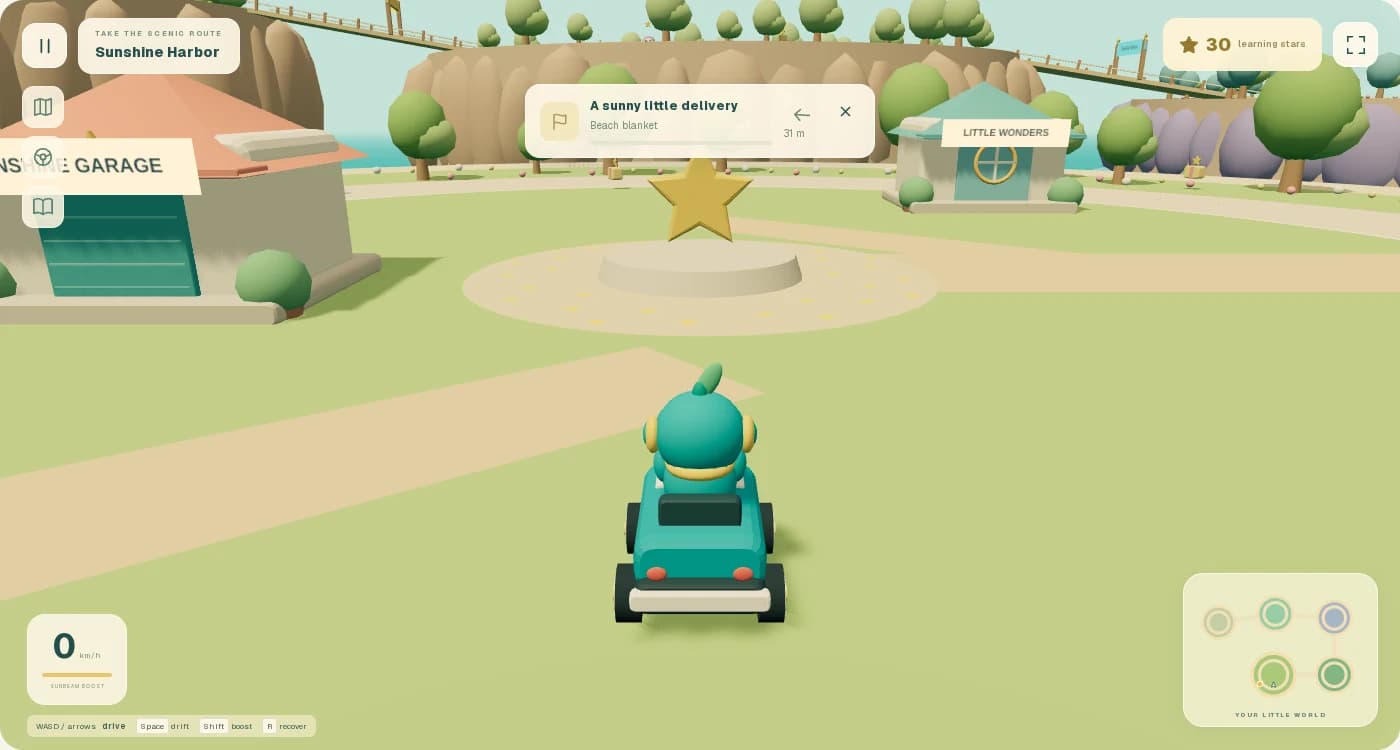
The LearnzyGo adventure game: a kart exploring Sunshine Harbor, with learning stars and island scenery

Complete learning stages. Unlock something new for your adventure.

Two subjects. Plenty to discover.

See what your child could explore today.

These examples come from LearnzyGo's actual curriculum. Both subjects offer age-based paths for children ages 5–15.

Math

From first sums to bigger ideas.

Visual number practice for younger learners. Fractions, percentages, algebra, and data as the challenges grow. Each age-based path breaks practice into short stages.

Example 1 of 3

Math · Visual number practice: 8 + 1 = ?

Age 6 example · Demo preview

8 + 1 = ?

Build number skills with pictures and short questions.

See the explanation

8 + 1 = 9.

Math · Percentages in practice: Find 25% of 600.

Age 12 example · Demo preview

Find 25% of 600.

Work through percentages and everyday number problems.

See the explanation

Multiply 600 by 25/100.

Math · Scale and geometry: A side grows from 7 cm to 28 cm. What is the scale factor?

Age 12 example · Demo preview

A side grows from 7 cm to 28 cm. What is the scale factor?

Use scale factors to connect drawings and real measurements.

See the explanation

New length ÷ original length gives scale factor.

World Explorer geography

A world beyond the classroom.

Start with directions, land, and water. Discover countries, flags, and capitals, then explore coordinates, climate, and world data in older learning paths.

Example 1 of 3

Geography · Follow a map: Robot needs energy. Which way to the charger?

Age 7 example · Demo preview

Robot needs energy. Which way to the charger?

Read directions and find your way through a visual map.

See the explanation

Move 2 squares north from A to reach B.

Geography · Recognise a flag: Which flag belongs to Iraq?

Age 10 example · Demo preview

Which flag belongs to Iraq?

Discover the colors and patterns of flags from around the world.

See the explanation

This is the flag of Iraq, in Western Asia.

Geography · Explore continents: Which continent or world region contains Bolivia?

Age 7 example · Demo preview

Which continent or world region contains Bolivia?

Recognise the continents and discover how the world fits together.

See the explanation

Bolivia is in South America.

How it works

A short quest. A new discovery. Something to unlock.

Choose math or geography, work through a focused stage, and see learning progress open up the adventure. Smart Help is there when a question needs another look.

Demo learner

Level 4 learner

320

XP

6

Badges

8/10

Quest

Illustrative walkthrough

Choose math or geography

Choose an age-based math path or explore maps, countries, and more in World Explorer geography.

Quest map

Subject path

12345

Illustrative walkthrough

Solve small challenges

Count with pictures, solve a number problem, follow a map, or recognise a country. Each question gives your child a clear task.

Question 4

What is 14 - 6?

6789

AI hint: Count back 6 steps from 14.

Illustrative walkthrough

Get a helpful hint

If your child gets stuck, the AI guide can give hints or explain the idea in friendly language.

Stage cleared

Learning progress and a new unlock

Illustrative walkthrough

Unlock the next adventure

Complete distinct learning stages to unlock game characters, kart styles, activities, and new areas to explore.

Learning-powered adventure

Their learning opens up a world to play in.

Rewards go beyond a collection. In the adventure game inside LearnzyGo, children drive around an island, meet characters, and use the unlocks earned through math and geography.

Actual LearnzyGo gameplay showing the learner's kart in Sunshine Harbor, an explorable island unlocked through learning
Demo preview · Actual in-app gameplay with fictional learning progress. Keyboard and touch controls.

Collect it. Choose it. Take it for a drive.

Complete distinct learning stages to unlock karts, characters, styles, activities, and new areas. Use eligible earned artwork as kart decals or trophy displays. Stars track learning milestones and are never spent; badges also remain in the collection.

  1. 1. Learn in either subject. Completed math and geography stages contribute to the same adventure.
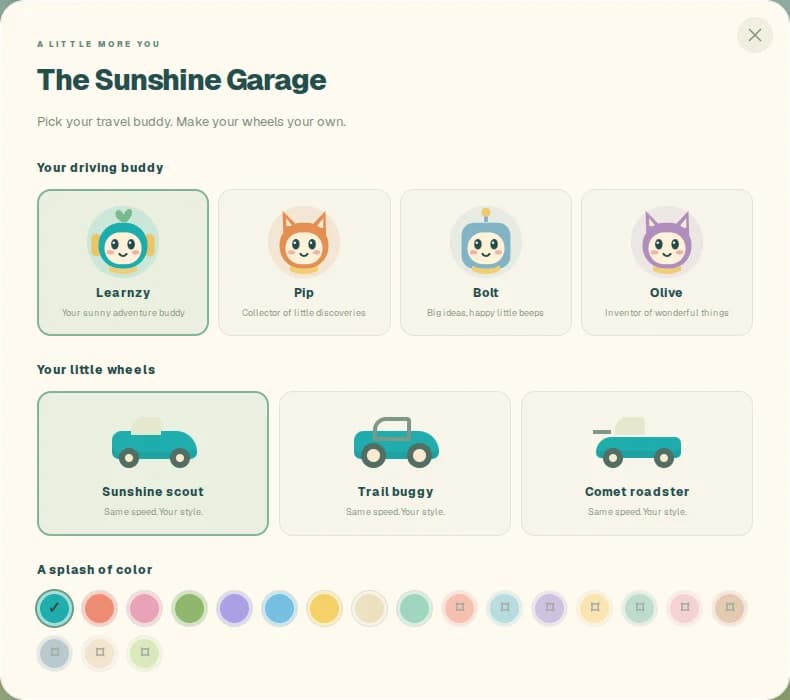
  2. 2. Make the kart your own. Choose unlocked characters, vehicles, colors, and accessories in the garage.
  3. 3. Head out and explore. Follow island roads, meet characters, and try missions and races against computer opponents.
The Sunshine Garage showing playable characters and kart customization choices unlocked by learning
Demo preview · The Sunshine Garage. Unlocks depend on completed learning stages.

Smart help at the right moment

A little help when a question feels hard.

Smart Help supports the current exercise with progressive hints and explanations. Your child can ask for a nudge, consider the next step, and try again.

AI hints before frustration

Your child can ask for a small nudge, a bigger clue, or step-by-step support. The goal is to guide them, not simply hand over the answer.

Friendly mistake explanations

When an answer is wrong, the AI guide can explain what happened in simple words that match the child's level.

Step-by-step support

Hard questions can be broken into shorter steps so the next try feels possible instead of overwhelming.

Progress parents can follow

Parents can see completed stages, rewards, and learning progress from the parent-owned account.

For parents

Their learning journey. Your family controls.

Parents create and own the account, control billing, and can follow progress. They may optionally invite one learner to sign in directly to their own private profile while family controls stay with the parent.

Parent-owned account

The parent owns billing and family settings and may authorize or revoke a learner's direct login.

Child profiles stay private

Learner profiles are used inside the family account only. They are not public profile pages.

Optional photos

Photos are optional. Parents can use avatars instead.

No public social feed

No public likes, comments, followers, or child posts.

AI learning support

Smart Help can be used for focused hints and mistake explanations during practice.

Parent view

Family progress

Maya

Subtraction quest 8

Private

Leo

Times tables warm-up

Private

Ari

Shapes and patterns

Private

Profiles

3

Billing

Parent

Photos

Optional

Social feed

None

Safe by design

AI used for learning - not open chatting.

LearnzyGo uses AI to support exercises inside a parent-owned learning account. It is designed for focused help, not free-form social conversation.

SafetyParent managed

Focused on education

AI is used for hints and mistake explanations inside learning tasks, not as a general chat experience.

Helps children understand

The AI guide can explain mistakes and break questions into easier steps.

Parent-managed settings

Parents manage the account, profiles, billing, and Smart Help settings.

Built for family use

The app is a private family learning space with no public profiles or social feed.

Start simple

Try math, geography, and a new adventure.

Start with selected starter stages for each available level during the seven-day trial. Explore math and geography, try Smart Help, and see the first learning milestones unlock the adventure.

For children ages 5–15. 7-day free trial. No credit card required.

Solo plan for one child

$2.99/ month

Start with selected starter stages for each available level during the seven-day trial. Explore math and geography, try Smart Help, and see the first learning milestones unlock the adventure.

  • Short learning quests
  • In-app adventure game
  • Math and geography quests
  • Learning rewards and in-app adventure
  • Parent progress overview
Start 7-day free trial

FAQ

Parent questions, answered plainly.

How do learning rewards work in the game?+

Completing distinct math and geography stages unlocks characters, karts, styles, activities, and new areas in the adventure game at Rewards. Eligible earned artwork can decorate the kart. Stars are never spent, and replaying a completed stage does not count as a new stage unlock.

Is the adventure a separate app?+

No. Open Rewards inside LearnzyGo to play. The single-player island adventure includes driving, character missions, and races against computer opponents, with keyboard or touch controls.

Is LearnzyGo an AI app?+

Yes. LearnzyGo uses AI to support learning with focused hints and friendly explanations after wrong answers. The app is structured around math and geography stages, progress, and learning-powered adventure rewards.

Can my child freely chat with the AI?+

No. The AI experience is focused on learning support inside exercises. It is designed to help with questions, mistakes, and hints, not to act as an open social chatbot.

Does AI give away the answer?+

The goal is to help the child understand, not simply give the final answer. Hints are designed to guide the child step by step so they can still solve the problem themselves.

How does AI help after a wrong answer?+

Smart Help can explain what went wrong in simple language and show a better way to think about the question.

Does AI replace parents or teachers?+

No. LearnzyGo is a practice tool. It helps children build confidence between school, homework, and parent support.

Can parents see progress?+

Yes. Parents can view progress by learner profile, including completed stages, XP, rewards, and areas that may need more practice.

Is LearnzyGo safe for children?+

LearnzyGo is built around parent-owned accounts and private family learner profiles. Parents manage the account, billing, profile settings, and Smart Help settings.

Which subjects can my child practise?+

LearnzyGo includes math and World Explorer geography in English for ages 5–15. Math ranges from early number skills to algebra and data. Geography includes directions, maps, countries, capitals, and age-based topics such as climate and coordinates.

How does the free trial work?+

Parents can create an account and start the 7-day free trial immediately, with no credit card required. The trial includes selected starter stages for each available level. Payment details are only requested if you later choose a paid plan.
Free weekly parent toolkit

A calmer week of maths, in one useful email.

Start with three short emails for building a manageable maths routine. Then get one practical activity, one confidence-building tip, and our newest parent guide each week.

For parents and caregivers. Confirm with one click. Unsubscribe anytime. Privacy details.

Start learning. See where it takes them.

For children ages 5–15. 7-day free trial. No credit card required.